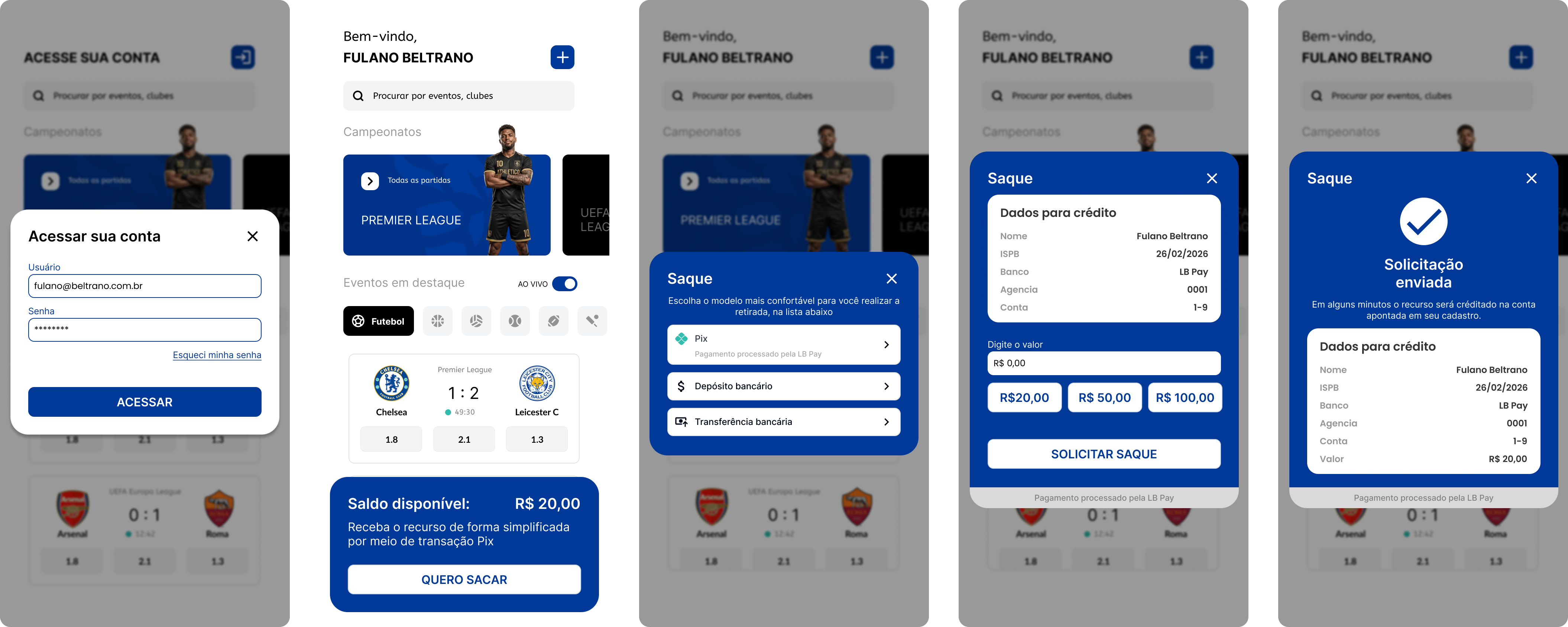
Operation Steps
Deposit
The deposit process using LB Pix is designed to offer users a seamless, secure, and compliant method of funding their accounts on the operator's platform. This chapter describes the complete customer journey—from login and deposit initiation to final wallet crediting.
Beyond the user experience, it also explains the operational and regulatory safeguards embedded in the system. These include CPF (Brazilian taxpayer ID) validation, the distinction between Secure Loop deposits (payments restricted to the depositor’s CPF) and CPF Shield scenarios (third‑party payments conditionally accepted), as well as automatic refund mechanisms when compliance rules are not met.
Additionally, operators may configure and enforce restrictions on registered bank accounts, ensuring that deposits and transfers are processed only through authorized financial channels. Together, these mechanisms balance convenience, security, and regulatory compliance, making LB Pix a robust solution for deposit management in the gaming and entertainment industry.
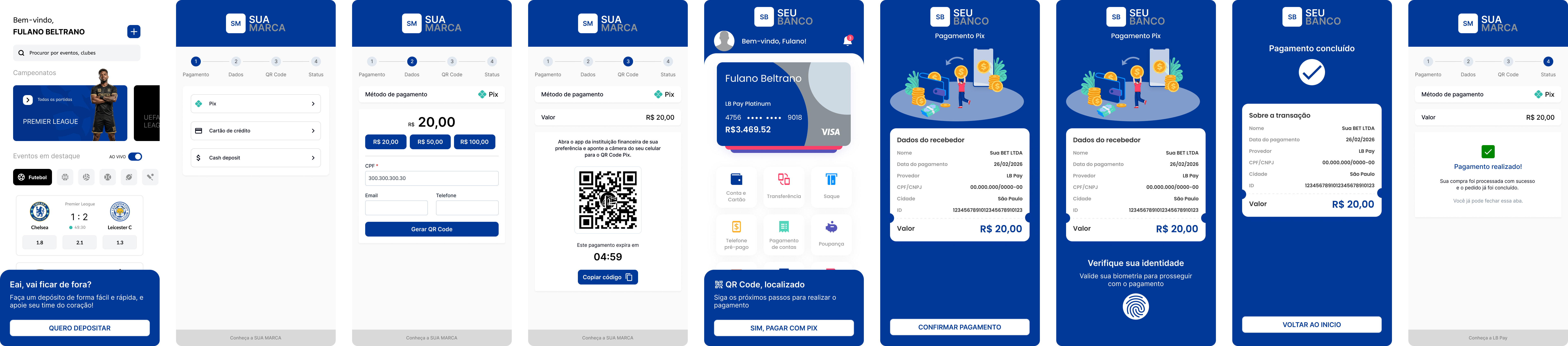
Customer Journey on Operator Site for Deposit via LB Pix
-
User Login
- The user logs into their account on the operator’s website.
-
Deposit Selection
- The user selects the deposit option.
-
Choosing LB Pix
- The user chooses LB Pix as the payment method.
-
Service Requirements and Consent
- The user reads and accepts the Terms and Conditions.
- The user provides consent for the use of the service and, if required by local regulations, enters beneficiary information.
-
Deposit Amount Selection
- Users may choose between:
- Option 1: A predefined deposit amount
- Option 2: A custom deposit amount
- Users may choose between:
-
Approval of Deposit Amount
- The user confirms the chosen amount.
-
QR Code Generation
- A PIX QR Code is generated and displayed on the operator’s site.
-
Payment via Banking App
- The user opens their banking app (any bank).
- Scans the QR Code.
- Confirms the PIX payment.
-
Transaction Completion
- The system processes the deposit, and the user’s wallet is credited.
-
Wallet Balance Update
- The deposited amount is added to the user’s wallet balance.
Deposit Payment via PIX QR Code
The PIX QR Code deposit process ensures a safe and flexible way for users to fund their accounts while adhering to regulatory requirements. Each generated QR Code is linked to the user’s CPF, enabling operators to control who is authorized to complete the payment.
There are two modes of operation:
-
LB Secure Loop
Only the original depositor’s CPF may complete the payment. -
LB CPF Shield
Third‑party payments may be accepted if the payer’s CPF meets the operator’s configured acceptance rules.
Operators may further enhance security by registering specific bank accounts for each user, ensuring that deposits occur only from authorized accounts. This layered approach minimizes risk, prevents unauthorized transactions, and gives operators full visibility and control.
LB Secure Loop
With the regulation of sports betting, ensuring accurate bank account registration and compliance has become essential. Traditional manual data entry (ISPB, account number, branch, account type) often leads to errors and failed validations, adding friction to the user experience. There is also a regulatory requirement to verify that the bank account belongs to the CPF holder.
LB Secure Loop solves these issues by enabling account registration through an initial deposit—without transferring funds to the operator’s transactional account until the bank account is validated.
Possible Scenarios
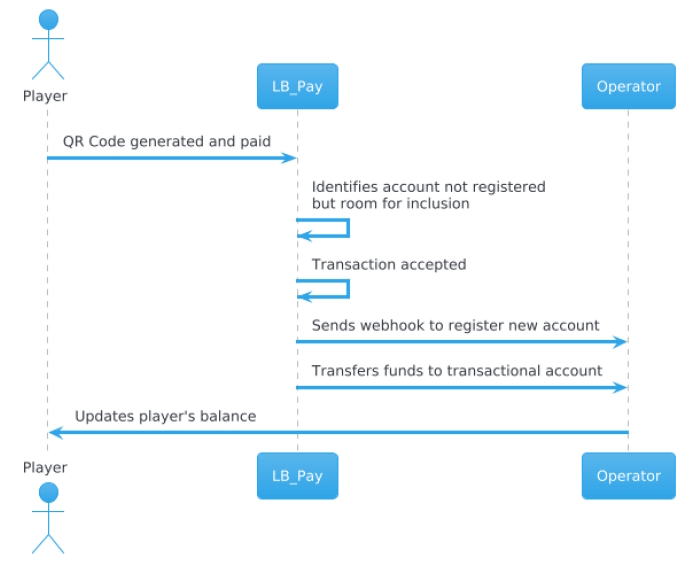
Scenario 1 – Unregistered account + fewer than 3 registered accounts → Accept
Description: The system identifies that the account used for the payment is not among the player’s registered accounts, but there is still room for new registrations (fewer than three accounts registered). The operator defines that the transaction should be accepted and the new account registered.
Process:
- The QR Code is generated and paid by the player.
- LB Pay identifies that the account used is not registered, but there is room for inclusion.
- The transaction is accepted.
- A webhook is sent to the operator to register the new account.
- Funds are transferred to the operator’s transactional account.
- The player’s balance is updated.
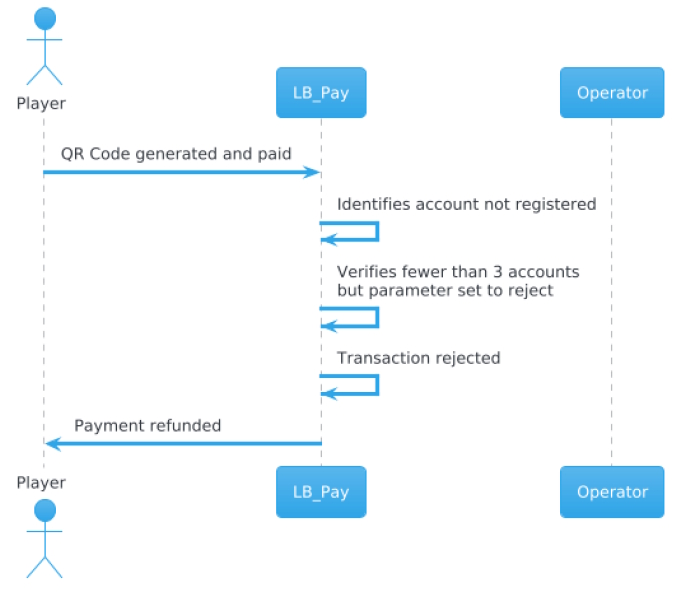
Scenario 2 – Unregistered account + fewer than 3 registered accounts → Reject
Description: The account used for the payment is not registered, and although there is room for new registrations, the operator defines that the transaction should be automatically rejected.
Process:
- The QR Code is generated and paid by the player.
- LB Pay identifies that the account is not registered.
- The system verifies that there are fewer than three accounts, but the parameter is set to reject.
- The transaction is rejected.
- The payment is refunded to the player.
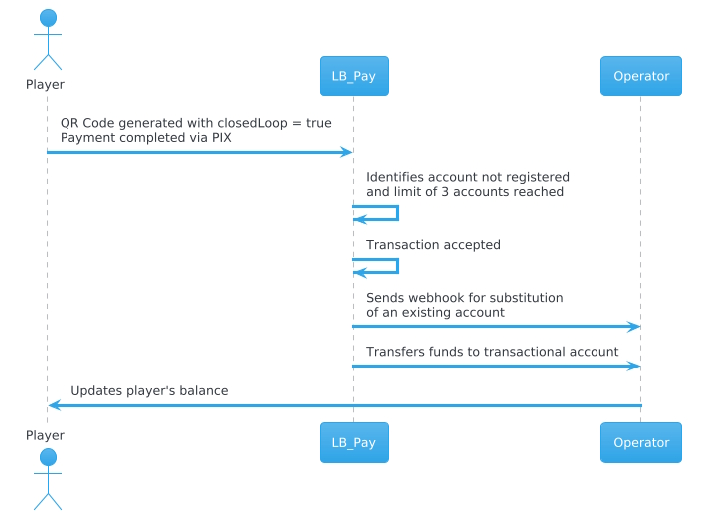
Scenario 3 – Unregistered account + 3 registered accounts → Accept
Description: The account used for the payment is not registered, and the player already has three registered accounts. The operator defines that, even with the limit reached, the transaction should be accepted and the new account replaces an existing one.
Process:
- The QR Code is generated with closedLoop = true.
- The player completes the payment via PIX.
- LB Pay identifies that the account is not registered and that the limit of three accounts has been reached.
- The system accepts the transaction and sends a webhook for substitution of an existing account.
- Funds are transferred to the operator’s transactional account.
- The player’s balance is updated.
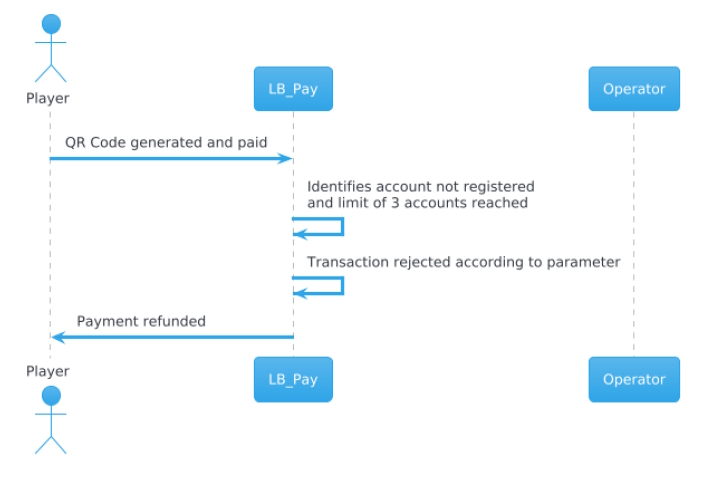
Scenario 4 – Unregistered account + 3 registered accounts → Reject
Description: The account used for the payment is not registered, and the player already has three registered accounts. The operator defines that, in this case, the transaction should be automatically rejected.
Process:
- The QR Code is generated and paid by the player.
- LB Pay identifies that the account is not registered and that the limit of three accounts has been reached.
- The system rejects the transaction according to the defined parameter.
- The payment is refunded to the player.
LB CPF Shield
The LB CPF Shield functionality was created to handle situations where a deposit payment is made by a third party, meaning by a CPF (Brazilian taxpayer ID) different from the one that originally requested the transaction.
In the prizes and betting market, this is relevant because the account holder is not always the same person who performs the payment — for example, a legal guardian, a family member, or an authorized individual. However, to prevent fraud and ensure compliance, the system must apply strict validation rules.
How It Works
-
Operator Configuration
- The operator defines whether or not to accept payments made by different CPFs.
- If accepted, the operator must configure which CPF statuses are allowed (e.g., REGULAR, MINOR, etc.).
-
Third-Party Payment
- The user generates the QR Code for the deposit.
- A third party completes the payment via PIX using their own CPF.
- The system checks whether the payer’s CPF status is included in the acceptance list defined by the operator.
-
Validation and Outcome
- If the CPF is accepted → The payment is processed normally, and the amount is credited to the player’s wallet.
- If the CPF is not accepted → The system initially accepts the payment but then automatically issues a refund.
- In this case, the operator receives a notification that the deposit has been marked as “Reversed.”
-
Benefits for the Prizes and Betting Market
- Regulatory compliance → Ensures that only valid and authorized CPFs can transact.
- Fraud prevention → Blocks deposits made by suspicious or unauthorized CPFs.
- Operational flexibility → Allows operators to accept third-party payments in legitimate cases (e.g., legal guardians).
- Transparency → Operators receive clear notifications about deposits accepted or reversed.
- Financial security → Non-compliant payments are automatically refunded, eliminating the risk of improper credit.
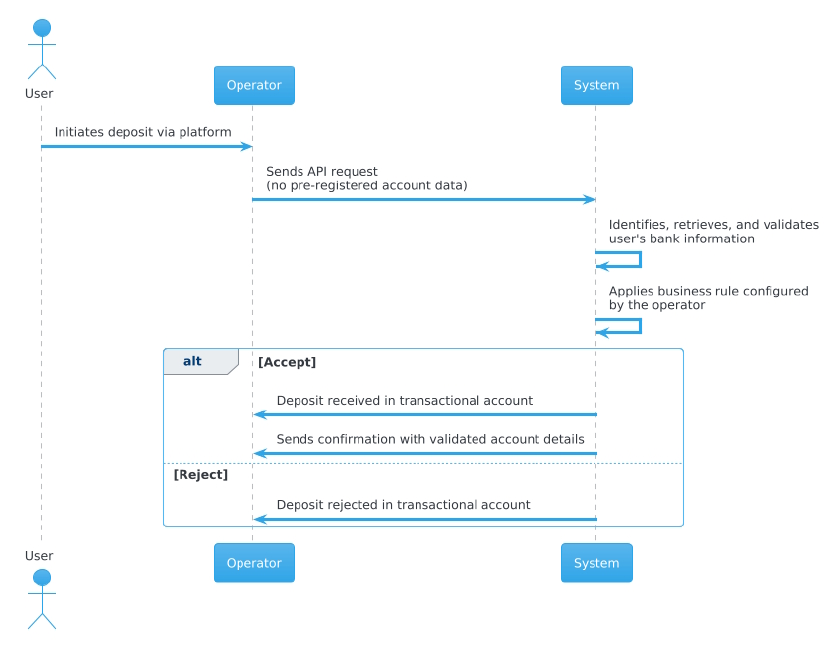
Flow – Deposit - No Registered Bank Account
- This flow is recommended for users who have not yet registered any bank account. It streamlines the initial registration and validation process while ensuring security and convenience.
Process Steps
- The user initiates the deposit through the operator’s platform.
- The operator sends the API request without including any pre-registered account data.
- Our system automatically identifies, retrieves, and validates the user’s bank information.
- Our system applies the business rule configured by the operator in their operation.
If Accept
- The deposit is received in the operator’s transactional account.
- A confirmation is sent back to the operator with validated account details, regardless of the payment initiation outcome.
If Reject
- The deposit is rejected in the operator’s transactional account.
Key Benefits
- Automatic registration → The player does not need to manually enter any information.
- Full confidence → Assurance of account ownership.
- Secure validation → Data confirmed directly through the transfer.
- Operational savings → Reduction in internal costs.
- Seamless experience → No changes to the user journey.
- Simple implementation → Integration without complex adjustments.
- Fraud prevention → Minimizes risks through secure validation.
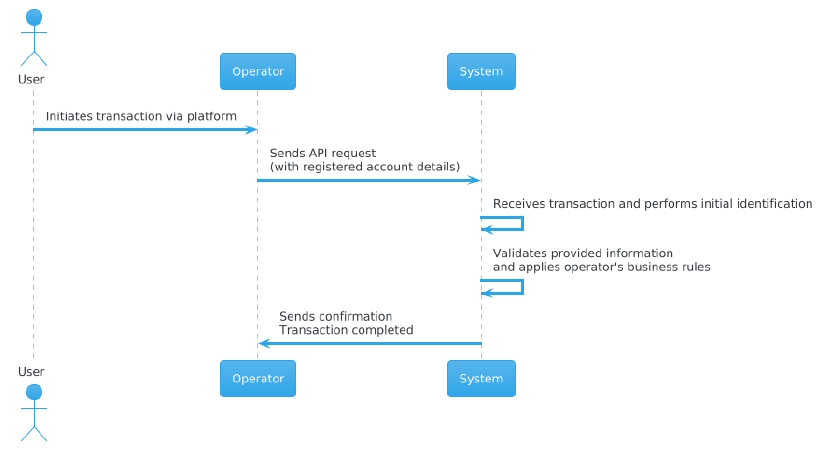
Flow – Deposit - Registered bank account
This flow is recommended for users who have already registered their bank accounts, with details securely stored by the operator.
Process Steps
- The user initiates a transaction through the operator’s platform.
- The operator sends an API request containing the previously registered account details.
- Our system receives the transaction and performs the initial identification.
- Next, the system validates the provided information, applying the business rules configured by the operator.
- After processing, the system completes the operation and sends a confirmation back to the operator, closing the flow.
Key Points
- The gaming operator must provide LB PAY with the bank account information for validation.
- The operator may register between 1 and 3 bank accounts (maximum of 3).
- If the payer’s account matches one of the registered accounts, the payment will be accepted.
- The deposit webhook will be sent to the operator.
Withdrawal
Customer Journey on Operator Site – Withdrawal
-
User Login
- The user logs into their account on the operator’s website.
-
Withdrawal Selection
- The user selects the withdrawal option.
-
Choosing LB PIX
- The user chooses LB PIX as the withdrawal method.
-
Service Requirements and Consent
- The user reads and accepts the Terms and Conditions.
- The user provides consent for the use of the service.
- If required by local regulations, the user enters beneficiary information.
-
Withdrawal Amount Selection
- Users may choose between:
- Option 1: A predefined withdrawal amount.
- Option 2: A custom withdrawal amount.
- Users may choose between:
-
Approval of Withdrawal Amount
- The user confirms the chosen amount.
-
Execution of Withdrawal
- The withdrawal is processed: the user’s wallet balance is debited, and the bank account linked to the user’s CPF is credited with the withdrawn amount.
-
Wallet Balance Update
- The updated balance is reflected in the user’s wallet after the withdrawal is completed.